
Awesome Notes: the Best Replacement for Apple’s Notes Application
I imagine several hundred iPhone applications are released everyday by Apple, but when an application comes along that is ten times better than one of Apple‘s default programs, it deserves a 5-star review. The application I’m speaking of is the appropriately titled Awesome Notes, developed by Bridworks. If you’ve always known that Apple‘s Notes application for the iPhone and the iPod touch is very limited, well Awesome Notes is a worthy solution and replacement for it.
Awesome Notes is beautifully designed, easy to use, and functional. The biggest difference between Bridworks' and Apple’s application is that Awesome Notes actually allows you to organize your notes into folders. Wow, what a concept! You would think after three iPhone system upgrades Apple would have included a simple feature for managing notes. But maybe that’s a good thing, because Awesome Notes does the note taking program the right way.
I’ve read another review of this awesome application that is downright nitpicky. The reviewer said the application has too many features making it a challeng to use. But after using the Awesome Notes for less than one minute, I thought I and the reviewer were using two different applications.
You can actually use Awesome Notes straight out of the box, so to speak. Folders and sample content are already set up. All of you have to do is customize the titles of the existing folders, add a few more your own if need be, and the application is good to go.
Awesome Notes features include:
Customizable pages and folders with colored folders and unique icons
Backup and Transfer to Google Docs
Password protection for folders
Landscape, list and thumbnail view
The one nifty little Quick Memo feature makes Awesome Notes stand above other similar note taking applications. Quick Memo is for jotting a note outside a folder or existing page. You can later save the note into a folder. When I used the Apple’s Notes, I created a similar quick note page, but Bridworks’s version is based on how we users want to input a quick note.
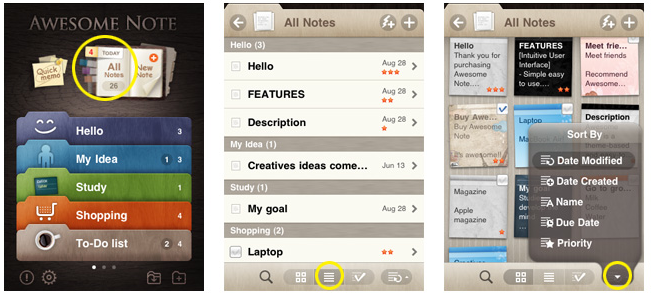
Bridworks has also made it possible for users to customize nearly the entire user interface of the application. I’m sure these developers get a long list of recommendations for improvement, but at version 1.6 the existing features are very sufficient, in addition to the posted list of forthcoming 2.0 updates awaiting Apple‘s approval.
I realize the popular and free Evernote application may be enough for many iPhone and iPod touch users, but Awesome Notes is worth four bucks because of its easy access and sleek design. I use Evernote also, but it’s more like a file draw of documents than a note talking application. The graphic interface of Awesome Notes is more accessible and functional than Evernote. And when Bridworks includes a way to add images to notes, it will have a perfect application.
Awesome Notes is so good I wish there were a way to permanently erase Apple‘s Notes from my iPhone.
 del.icio.us
 Digg
Digg Facebook
 Slashdot
 StumbleUpon




Comments
Another great alternative is Simplenote. I love the simplicity of both their iPhone app and web interface and the search is perfectly implemented. No bells and whistles, just notes.
Who proof reads these stories? Terrible number of mistakes and horrendous use of the apostrophe. See below for the majority of problems!
“I image several hundred iPhone” = “I imagine several hundred iPhone”
“tens time” = “ten times”
“making it a challenging to use” = “making it a challenge to use”
“But after using the Awesome Notes” = “But after using Awesome Notes”
“When I used the Apple’s Notes” = “When I used Apple’s Notes”
“but Bridworks’s version is based” = “but Birdworks’s version is based”
“Bridworks has also made it possible” = “Birdworks has also made it possible”
“because of it’s easy access” = “because of its easy access”
“like a file draw of documents” = “like a file drawer of documents”
“And when Bridworks includes a way” = “And when Birdworks includes a way”
“I wish there a way to permanently Apple‘s Notes” = “I wish there a way to permanently remove Apple‘s Notes”
Just spotted another.
“I wish there a way to permanently Apple‘s Notes” = “I wish there was a way to permanently remove Apple‘s Notes”
Parky, thanks for pointing out the errors. Great to have your kind of readership.
Then it is a pity it says Birdworks so many times at the start of the story and then changes to Bridworks.
Still not fixed!
Hi all,
Thank you for pointing these errors out. I know how frustrating this kind of thing can be for readers, and you have my sincere apologies for not proofreading this article before posting it. I am having childcare issues that have prevented me from doing my job consistently over the past week. I have gone through and proofed the article and fixed these problems. Better late than never, but again, sorry for having to make you work so hard to get at Bakari’s meaning. Cheers.
No problem, happy to help.
I agree the Awesome Notes is Awesome! But only for the itouch and not for syncing. I have moved away from a PDA to an Itouch and so I have been looking for something to sync my notes with. Awesome Notes works great on the itouch but it doesn’t translate to any computer program. I haven’t found anything to sync it with. I know I can import and export using Google docs but that is so antiquated. Syncing options are all they should be including these days. Google docs doesn’t even come close to matching the Awesome Notes interface. Plus folders don’t export either. Why oh why don’t they just have a program called Awesome Notes for the Mac???
And FYI I tried searching Awesome Notes on this Applematters site and it comes up with nothing! I had to page through to find it once I worked out it would be under ‘review’.
Wackyguys, I agree. As much as I like the design of Awesome Notes, it’s not as useful for syncing content between desktop and iPhone. I still use it, but not like I use two other note apps, like Pastebot, to quickly sync information.
As for the search engine on AppleMatters, I’ve experienced the same problem when trying to find my own articles. I’ll see if the editors are aware of the problem.
Can you believe it? I just received an update for Awesome Notes and there is now a Sync for Google docs. Amazing.
Parky needs a girlfriend. That is the only explanation for his behavior.
Helping would be to msg the author discretely about the issues. Why would you want to embarass him/her like that when there is no need?
TheGooch needs a life and some glasses, why bother to comment about something that is 10 months old!!
And for your information there was no way to contact the author directly.
I have read many articles here on this website about I-Phone applications, but I never found anything about a regcure application. Is there such a thing? The I-Phone is basically a small computer with an operating system.
Using i OS 4 or later, you can sync Notes over the air using Mobile-Me or an I MAP email account. This article explains certain sync behaviors and shows how to enable Notes syncing.
Senior Healthcare Consultants