
Decode Your Digital Photos with Reveal
I like iPhoto. It’s hard to find someone who doesn’t. But it’s still got it’s shortcomings. One of them is that when you click “Get Info” on a photo, well, you don’t always get enough info, and what you do get can be confusing. Enter Reveal, a cross platform, photo-data viewer.
First a little explanation. All photos taken with digital cameras have recorded with the image, special information called EXIF data. Without getting into technicalities about what EXIF data is all about, it simply means the camera records useful information you can later refer to, such as camera model, date and time the photo was taken, white balance setting, shooting mode, aperture, ISO, shutter speed and so on.
Reveal presents that information in a much more easily understood way.
Comparing Reveal and iPhoto’s Get Info
Let’s compare the screens from Reveal and iPhoto’s Get Info.
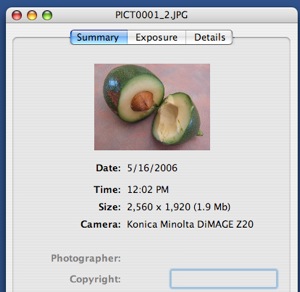
Firstly the summary information.
Here’s Reveal’s:
And iPhoto’s:
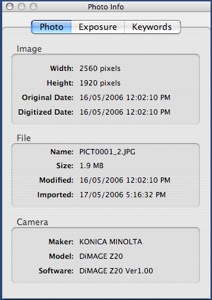
Not a lot of difference, as you’d expect. A little more on iPhoto’s but that info is available on Reveal’s Details page. Reveal’s page is more appealing to the eye.
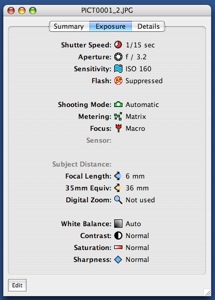
Next we look at the Exposure information. Firstly from Reveal:
And from iPhoto:
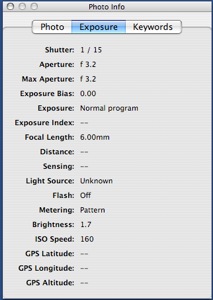
Immediately you’re struck how much more visually appealing Reveal’s interface is, which greatly helps make more sense of the information being presented. Reveal identifies the difference between the Flash not firing, and being suppressed. The identification of the Focus type is also quite useful as well.
In iPhoto, the White Balance is the “Light Source” value, which is displaying unknown in my example. It does correctly display when I use one of the presets, such as Daylight or Fluorescent. Also, iPhoto incorrectly labels the Auto Shooting Mode “Normal Program”.
The only advantage iPhoto’s Exposure page offers over the Reveal’s, is the inclusion of the Exposure Bias. The inclusion of GPS info is a bit contradictory, as that is information at this stage, only recorded on very high-end cameras, yet iPhoto seems to be aiming at the beginner to amateur.
Significantly, at this point, you’ve reached the end of the information iPhoto provides. That may be enough information most of the time, and that is Apple’s way and I understand why they do that (except for the GPS info). But if you are somewhat of a photo buff and want more information, Reveal provides it, giving in its Details page, all the EXIF data for the image, albeit, in it’s raw format.
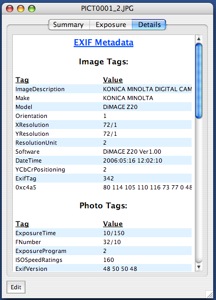
One other handy feature of Reveal is, it allows you to edit the data on the Summary and Exposure pages. Generally you shouldn’t need to, but you may find it useful to add the photographer’s name and copyright, and, for the professional, the subject’s distance.
Overall
Reveal is both more useful and more friendly than Apple’s offerings in iPhoto, Preview and Finder. It is useful to the professional, amateur and even the beginner. At no charge, there’s no reason not to add it to your photo toolset. Highly recommended: 9/10
 del.icio.us
 Digg
Digg Facebook
 Slashdot
 StumbleUpon




Comments
Hello, Chris—
Well, I stopped using iPhoto after experiencing a series of problems. The worst one happened when I transferred data onto a new Powerbook and iPhoto could not find the photo library, and when it did, could not recognize the photos. That experience made me think iPhoto is unreliable. Now I use Bridge and Photoshop. I don’t have the many little conveniences of iPhoto, but I haven’t had to rebuild a library either.
Best,
Mike
May be this would help me decode my photos. But I think I should take a look at this software.
Product liability
I was looking for this software since for a while, finally I got, Thanks.
Resource Planning
Whereas that experience made me think of iPhoto is untrustworthy. Now, use the Bridge and that Photoshop.
Storage Self Storage
Worst case occurred when I transferred data from a new Powerbook, and did not find photo from your iPhoto libraries.
Joann fabrics coupons
I have not a number of little comforts iPhoto, but I have not had to build the library either in.
Owner Builder Insurance online quote
Having a worst occurred when I transfer data to a new Power book and in iPhoto could not find a photo archival.
Calculator Rca
I was looking for this software for my tablet pc news since for a while, finally I got, Thanks.
I don’t think Ive seen all the angles of this subject the way youve pointed them out. You’re a true star a rock star man. You’ve got so much to say and know so much about the subject that I think you should just teach a class about it.affordable car insurance
deck de madeira | Lanchas usadas| piso de bambu
Having a worst occurred when I transfer data to a new Power book and in iPhoto could not find a photo archival. teleprompter
May be this would help me decode my photos. But I think I should take a look at this software. Garden Services Calne
I am sure that people today are smart as customers and they do have their great values in life whenever it comes to the quality, they will surely pick the best affordable choice they can have from the market.they
Ultimate Wow Guide Review
Well, that’s excellent article! I enjoy reading the articles that have good information and ideas to share with each reader. I hope to read more of you and continue that good work is very inspiring for us.bankstellen
Ive read your stuff before and youre just too awesome. I love what youve got here, love what youre saying and the way you say it. You make it entertaining and you still manage to keep it smart. I cant wait to read more from you. This is really a great blog.whitening trays